

Quickstart
Your order includes a packing slip. It has a printable keymap of the default layout: packing slip.
-
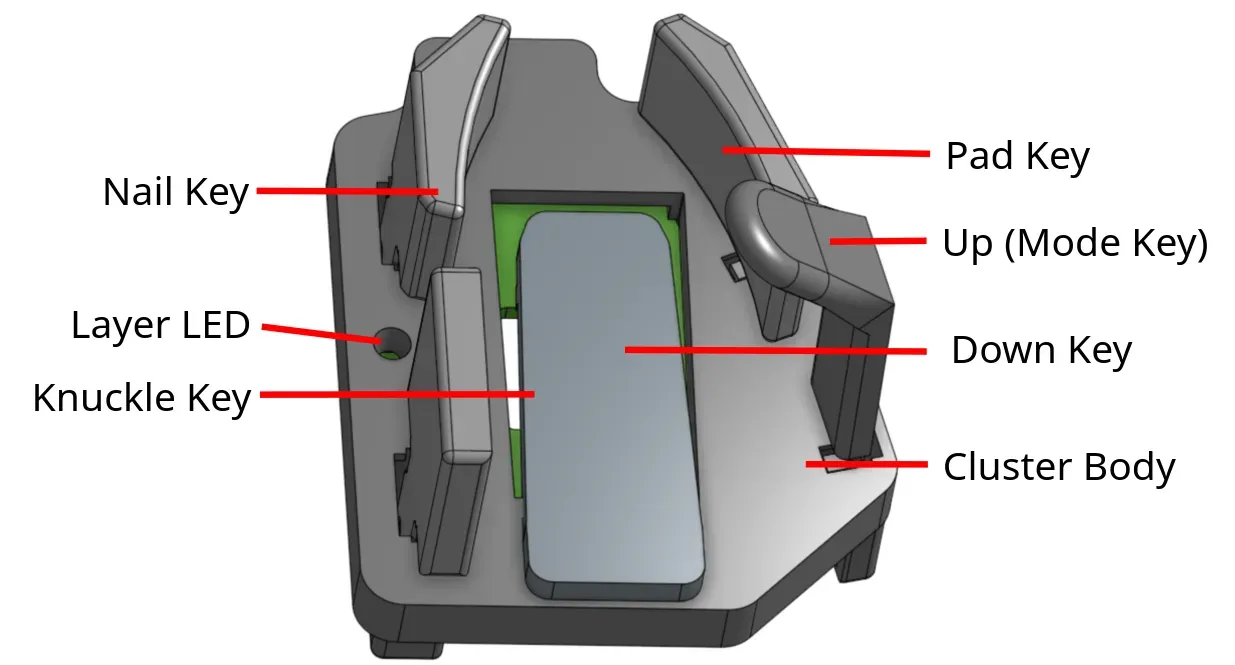
Insert all thumb keys. The Nail key is mirrored for left and right.
-
Connect the two halves with a USB-C cable between the ports marked S (or ↔). This is the split cable.
-
Connect one half to your computer with the port marked U. This is the main half.
- If you have a TrackPoint, the TrackPoint half must be the main half.
- Otherwise, make the half with your main pointing device the main half. The main half performs better.
-
Open Keybard and check every key in its Matrix Tester (see Check every key with Matrix Tester). On Vial, use Vial’s Matrix Tester (see The Vial app).
-
Fit the board to your hands (see Fit). Start with the fit video playlist.
Changes you make in Keybard take effect on the keyboard right away. No flashing needed.
Not sure which firmware your board runs? See Which firmware.